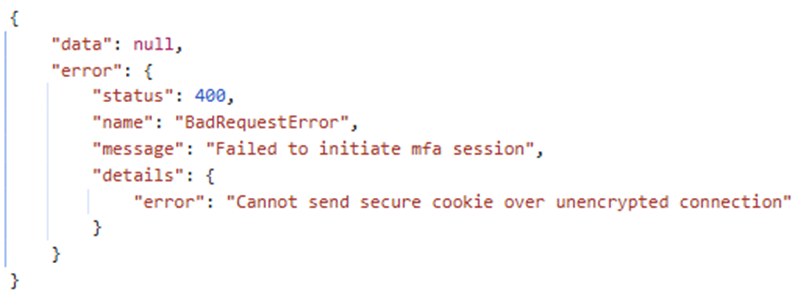
Failed to initiate MFA Session
⚠️ Common issue for production environment
Note: In order for Headlockr to function properly in a production environment additional steps are required.
By default Strapi doesn't handle SSL termination. It runs as a Node.js app over HTTP. HTTPS/SSL is typically handled by something in front of it, such as:
- Nginx
- A cloud load balance (e.g. AWS ALB, Azure App Gateway, Cloudflare etc.)
- HA Proxy
- Platform providers (Heroku, Railway, Digital Ocean etc.)
As Strapi states themselves they do not implement SSL natively since it's extremely insecure to directly offer a Node.js application to teh public web on a low port. You can read more about this topic here
What steps do I need to take to make Headlockr work in production?
First of all it's important to enable the proxy setting in the config/server.js file
export default ({ env }) => {
  return {
    url: env("URL_PANEL_API"), // ❗️ Important: set this line to the public url of your admin panel in order to have your users redirected to the correct url after logging in.
    host: env("HOST", "0.0.0.0"),
    port: env.int("PORT", 1337),
    proxy: {
      koa: true, // ❗️ Important: set this line in your config
    },
    app: {
      keys: env.array("APP_KEYS"),
    },
    webhooks: {
      populateRelations: env.bool("WEBHOOKS_POPULATE_RELATIONS", false),
    },
  };
};
Make sure you have end to end SSL encryption
Headlockr might block your login request if it detects an insecure connection. By default, the highest level of security is enabled in the default configuration. This includes the secure.cookie setting (in Headlockr config), which is set to true.
When secure.cookie is enabled, your application must be served over HTTPS end-to-end. If you are using a reverse proxy or CDN such as Cloudflare, avoid configurations like Flexible SSL, where HTTPS is only used between the browser and the proxy but HTTP is used between the proxy and your server. In that case, Strapi will detect the connection as insecure and refuse to set secure cookies. Instead, use Full (Strict) SSL (or an equivalent configuration), ensure HTTPS is enforced all the way to your application, and configure Strapi to trust the proxy so it correctly recognizes secure requests.